Rozšiřte možnosti správy MediaMonkey.
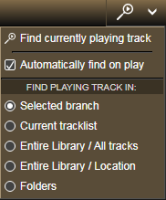
Umožňuje automaticky vyhledat a zobrazit složku, která obsahuje aktuálně přehrávanou skladbu ve zvolené větvi Mediálního stromu, kdykoli program začne přehrávat jinou skladbu. Po nalezení složky, která obsahuje, bude aktuálně přehrávaná skladba vybrána v hlavním seznamu skladeb.
Neexistuje žádné přímé stahování, doplněk bude zaslán e-mailem po obdržení daru. Bezplatná verze pro MM4 je k dispozici ke stažení na jeho webových stránkách.
Translated automatically (see original)It allows finding and displaying of the folder that contains the currently playing track within the selected branch of the Media Tree automatically whenever the program starts to play another track. After the containing folder is located, the currently playing track will be selected in the main tracklist.
There is no direct download, the add-on will be send by e-mail after received donation. The free version for MM4 is available for download at its web site.
Hide original
By
Zvezdan Dimitrijević
Autor ZvezdanD
Aktualizováno 20/06/2022
Historie verzí / podrobnosti
- Verze:
- 2.0
- Aktualizováno:
- 20/06/2022
- Pracuje s:
- Media Monkey 5
- Změny:
Added: version of the add-on for MediaMonkey v5.
Tento doplněk zvýrazňuje soubory s nízkou bitovou rychlostí ve výpisech souborů.
Translated automatically (see original)This addon highlights low-bitrate files in file listings.
Hide original
By
Ventis Media, Inc
Autor drakinite
Aktualizováno 08/12/2020
Historie verzí / podrobnosti
- Verze:
- 1.0
- Aktualizováno:
- 08/12/2020
- Size:
- 1.25 KB
- Pracuje s:
- Media Monkey 5.0.0 - 5.0.0
Monitor seznamu nejlepších
Monitor top listů promění vaši historii poslechu v MediaMonkey 5 do dynamických, interaktivních žebříčků ( nejlepší alba , nejlepší skladby a nejlepší interpreti ) s podrobnými metrikami, které vám pomohou analyzovat a efektivně zvyšovat vaše hodnocení.
Klíčové vlastnosti a funkčnost
3 vyhrazené zobrazení pořadí: Sleduje nejlepší položky podle kumulativního počtu přehrání (alba/interpreti) nebo počtu přehrání jednotlivých skladeb (skladby).
Inteligentní logika hodnocení: Používá standardní soutěžní pořadí (1-2-2-4) se spravedlivým přístupem k remízám (remízové položky se nikdy nevynechávají).
Metriky motivačního naslouchání:
Do dalšího umístění / milníku: Zobrazuje přesný počet přehrání potřebný k dosažení další pozice, násobku 50 nebo nejvyššího milníku (Top 100, Top 50 atd.).
Efektivita a časová efektivita: Vypočítává „pozice v žebříčku získané za přehrání“ a „pozice získané za hodinu poslechu“.
Indikátory náskoků a aktivní zóny: Zvýrazňuje těsné mezery (žlutá „aktivní zóna“) a vizualizuje náskoky nad nižšími pozicemi pomocí barevně odlišených upozornění (červená/žlutá/zelená).
Sytost a průměry: Zobrazuje, jak koncentrované jsou vaše poslechové návyky (např. % z celkového počtu přehrání v Top 10/100).
Výkonné filtrování a navigace:
Filtrovat podle žánru , roku vydání nebo roku přehrání (např. analyzovat vydání z 90. let přehrávaná v konkrétním roce).
Kliknutím na libovolnou položku přejdete přímo na dané album, skladbu nebo interpreta ve vaší knihovně MediaMonkey.
Export playlistu jedním kliknutím: Exportujte nejlepších $N$ alb, skladeb nebo nejlepších skladeb podle interpreta jako statické playlisty seskupené ve vyhrazené složce.
Plně přizpůsobitelné: Nastavte si individuální délku seznamů, minimální prahové hodnoty přehrávání a velikosti exportovaných seznamů skladeb pro každou kategorii.
Top List Monitor
Top List Monitor turns your MediaMonkey 5 listening history into dynamic, interactive ranking lists (Top Albums, Top Songs, and Top Artists) with detailed metrics to help you analyze and boost your rankings efficiently.
Key Features & Functionality
Hide original
3 Dedicated Ranking Views: Tracks top items by cumulative play counts (Albums/Artists) or single track plays (Songs).
Smart Ranking Logic: Uses standard competition ranking (1-2-2-4) with fair tie handling (tied items are never omitted).
Motivational Listening Metrics:
To Next Rank / Milestone: Shows exact play counts needed to reach the next position, multiple of 50, or top milestone (Top 100, Top 50, etc.).
Efficiency & Time-Efficiency: Calculates "rank places gained per play" and "places gained per hour of listening time".
Lead & Hot Zone Indicators: Highlights close gaps (yellow "Hot Zone") and visualizes leads over lower ranks with color-coded alerts (Red/Yellow/Green).
Saturation & Averages: Displays how concentrated your listening habits are (e.g., % of total plays in your Top 10/100).
Powerful Filtering & Navigation:
Filter by Genre, Release Year, or Play Year (e.g., analyze 1990s releases played in a specific year).
Click any entry to jump directly to that album, track, or artist in your MediaMonkey library.
1-Click Playlist Export: Export Top $N$ albums, songs, or top tracks per artist as static playlists grouped in a dedicated folder.
Fully Customizable: Set individual list lengths, minimum play thresholds, and playlist export sizes per category.
By
AI (Inspired by Fetznschaedl)
Autor fetzenschaedl
Aktualizováno 17/09/2026
Historie verzí / podrobnosti
- Verze:
- 0.6
- Aktualizováno:
- 17/09/2026
- Size:
- 216.27 KB
- Pracuje s:
- Media Monkey 2024 - 2024
- Změny:
Features
-
Distinct Menu Icons (v0.6.0): Added unique toolbar icons for all menu entries (Top List Monitor, Top Albums, Top Songs, Top Artists, Top Genres) using built-in MediaMonkey 5 icons and a custom SVG (charts.svg).
-
Genre Filter "Contains" Mode (v0.5.9): Introduced a toggle chip (= Exact vs. ⊇ Contains) enabling substring search across genres, direct text filtering on Enter, active filter indicators in UI/filenames, and automatic filter re-application when toggling modes.
-
Performance Optimization for Top Songs & Artists (v0.5.6): Extended the RANK() window-function optimization to Top Songs and Top Artists, reducing queries from 2–3 full table scans down to a single query pass.
-
- Verze:
- 0.5
- Aktualizováno:
- 02/09/2026
- Size:
- 188.46 KB
- Pracuje s:
- Media Monkey 2024 - 2024
- Změny:
What’s New in v0.4.6 – v0.5.0
-
CSV Export (v0.5.0): Added an "Export as CSV" button to all lists (Albums, Songs, Artists, Genres). It exports whatever data is currently visible in the grid (respecting active filters/sorting) using UTF-8 with BOM for proper Excel compatibility.
-
"Rank by" Metric Switching (v0.4.7): You can now switch the ranking basis between Plays and Listening time for Albums, Songs, and Artists. Choosing "Listening time" recalculates all metrics (Rank, Rank gain, Hot Zone, Efficiency, etc.) based on estimated total listening time instead of pure play counts.
-
"Listening time" Column (v0.4.6): Introduced a dedicated column in Albums, Songs, and Artists lists showing estimated cumulative listening time ({plays} x {track length}).
-
- Verze:
- 0.4.5
- Aktualizováno:
- 29/08/2026
- Size:
- 167.62 KB
- Pracuje s:
- Media Monkey 2024 - 2024
- Změny:
? What's New in Version 0.4.5 ? Enhanced Rank Trend Analysis
-
Dynamic Period Support: Rank Trend now works dynamically with short-term Period filters (e.g., Last 7/30/90/180/365 days) by comparing current performance against the equivalent previous timeframe.
-
Year Trend Indicators: Track how entries move over time compared to their status at the start of the year, including gain/loss indicators, new entries, and a dedicated "Fell out of Top N" section.
-
Improved UI & Tooltips: Renamed to "Rank trend" with automatically updating headers, hints, and context tooltips.
⚙️ Unified Step Logic & Custom Thresholds
-
Flexible "Rank gain at +" Field: Replaced fixed dropdowns with a customizable input field (1–100) that defaults directly to your list’s Hot Zone threshold.
-
Consistent Calculations: Unified time efficiency (rank/h), rank gain, and efficiency metrics to share the exact same step size across all calculations.
?️ Bug Fixes & Performance
-
Promise Handling Fix: Fixed an issue where dialogs would get stuck on "Loading..." when trend data was fetched.
-
Accurate Filtering & Headers: Fixed bugs where minimum play requirements were bypassed for baseline rankings and where custom "Max entries" limits were ignored in tooltips.
-
- Verze:
- 0.3.1
- Aktualizováno:
- 21/08/2026
- Size:
- 141.31 KB
- Pracuje s:
- Media Monkey 2024 - 2024
- Změny:
v.01.1 - v0.3.1
-
New Top Genres List: Added to Tools → Top List Monitor → Top Genres, showing total plays, library share, and distinct counts for songs, artists, and albums per genre (with multi-genre track support). Configurable via Settings.
-
Performance & UI Fixes: Optimized Top Genres loading on large libraries via SQL pre-grouping, and added a visual gap between columns and scrollbars across all list windows.
-
Configurable Hot Zones & Rank Gain Expansion: Hot zone thresholds are now individually adjustable per list (defaulting to 2 for Songs, 10 for Albums/Artists). Expanded "Rank gain at" dropdown options up to +50, and added an explanatory hover tooltip to the Efficiency header.
-
Header & Footer Quick Controls: Added session-overriding header inputs for "Max entries" and "Min plays" with custom stepper controls, alongside an inline playlist entry count field in list footers for live updates.
-
Playlist & Filtering Improvements: Standardized playlist naming patterns to encode active filters, switched playlist export dates to ISO 8601 format ([YYYY-MM-DD]), and introduced a "Period (Plays)" filter (7 to 365 days / All time).
-
System & Code Maintenance: Added optional keyboard hotkeys for main lists, expanded the Settings dialog layout, and consolidated shared dialog helper logic internally.
-
- Verze:
- 0.1
- Aktualizováno:
- 18/08/2026
- Size:
- 106.62 KB
- Pracuje s:
- Media Monkey 2024 - 2024
V závislosti na vašem zdroji můžete mít v audioknize stovky souborů z několika CD.
Každé CD má svá vlastní čísla skladeb, což znamená, že na celém albu se může objevit několik stejně pojmenovaných skladeb.
Pro některé audio přehrávače je noční můra rozpoznat správné pořadí.
Track Entitler pouze nabízí možnost automatického pojmenování skladeb na základě jejich čísla.
Proces
- Ujistěte se, že všechny soubory mají čísla skladeb ve správném a postupném pořadí.
- Vyberte všechny skladby, které chcete přejmenovat.
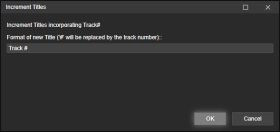
- Klikněte pravým tlačítkem myši na Upravit štítky (nebo použijte Nástroje > Upravit štítky ) a vyberte Zvýšit názvy .
- Přidejte text, který chcete mít u nově pojmenovaných skladeb.
Znak # bude nahrazen číslem skladby.
Příklady
Číslo skladby
Skladba 1
Skladba 2
Skladba 3
...
Nový měsíc # 102
Nový měsíc 1 ze 102
Nový měsíc 2 ze 102
Nový měsíc 3 ze 102
...
Depending on your source - you may have hundreds of files in an audiobook from several CDs.
Each CD its own track numbers, which means you may end up with several identically named tracks in the entire album.
A nightmare for some audio players to gifure out the correct order.Track Entitler merely offers the possiblilty to automatically name the tracks based on the track number.
Process
- Make sure all files have Track Numbers in correct, sequential order.
- Select all tracks you want re-entitled.
- Right-click Edit Tags (or use the Tools > Edit Tags), and select Increment Titles.
- Add the text that you want your newly entitled tracks to have.
The character # will be replaced by the track number.Examples
Track #
Track 1
Track 2
Track 3
...
New Moon # of 102
New Moon 1 of 102
Hide original
New Moon 2 of 102
New Moon 3 of 102
...
By
ConcernedWife
Autor ConcernedWife
Aktualizováno 08/10/2025
Historie verzí / podrobnosti
- Verze:
- 1.0.2
- Aktualizováno:
- 08/10/2025
- Size:
- 2.41 KB
- Pracuje s:
- Media Monkey 5 - 5
- Změny:
Initial version